Records, books and packs
Maelstrom reads books: rulebooks, bestiaries and adventures, with their pictures, maps and links. Its own games' books come with it; your Fantasy Grounds modules are read where they are; and Maelstrom packs (.kpack) make each of your books one file that opens anywhere. This page covers the sidebar, books and modules, packs, sharing with players, and editing records.
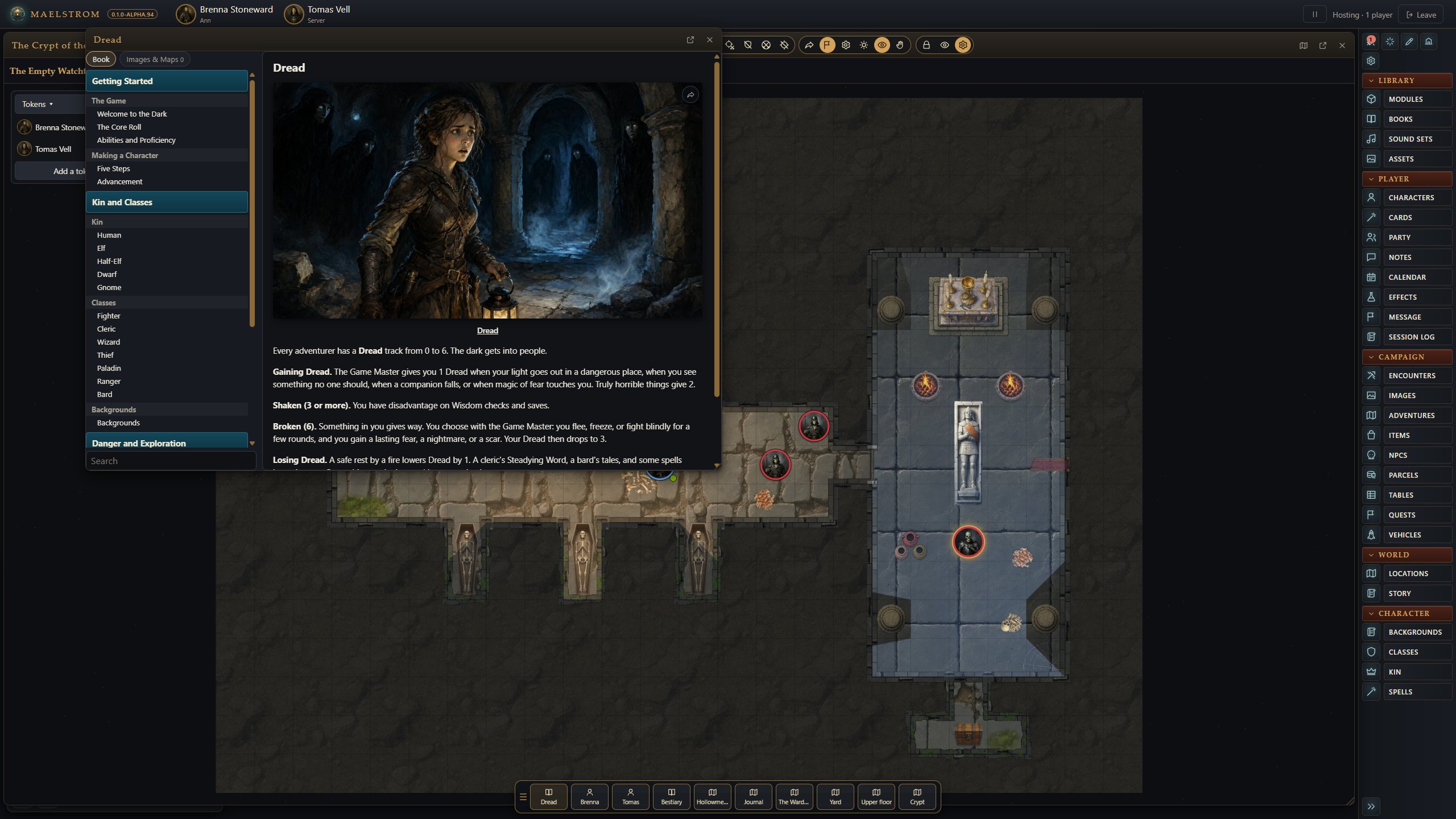
The sidebar
The sidebar on the right holds everything, as Fantasy Grounds' does:
| Part | What is in it |
|---|---|
| Tools along the top | The combat tracker, the assistant (the AI agent), Map Studio, the players, settings. |
| Library | Modules (every module and pack for the campaign's game), Books (the active books, to read), Assets, Sound Sets. |
| Player | Characters, Party (the party sheet), Notes. |
| Campaign | Encounters, Images (maps and handouts), Items, NPCs, Parcels, Quests, Tables. |
| World | Story (each active adventure's story entries, and the campaign's own). |
| Character | The game's own lists (classes and races, or Paths and Origins) to drag onto a character. |
The categories fold away, and the arrow at the bottom collapses the sidebar to icons. Every window can be moved, resized and popped out to its own window on another monitor. Its sidebar button closes it wherever it is.
Everything is a link. Anything that looks like a link can be dragged: onto a sheet, into chat, into a story entry, onto a quick slot.
Books and modules
- Maelstrom's own games' books are always on the shelf for their campaigns, and the SRD 5.2.1 books for a D&D 5E campaign.
- Your Fantasy Grounds modules: Maelstrom reads them in place from your Fantasy Grounds data folder's
modulesfolder. Nothing is copied. (Set theKRAKEN_BOOKSenvironment variable to read another folder.) A campaign's game decides which modules fit it. - Make a book active in Modules to bring its records (NPCs, items, encounters, maps, story) into the campaign. A book that is not active is off limits: its pages, pictures, maps and records open only once it is.
- Books lists only the active books, to read. A player sees only the ones you open to them; a players' book can be shared with the players.
- Every list (Items, NPCs, Spells and the rest) shows every active book's records under the book's name.
Links in a book
Links work as in Fantasy Grounds: a page, a picture, or a record the book holds (a creature, spell, item, class, race, feat, table, encounter) opens in its own window. A table shows as a table, an equipment list as its sections, and a web link opens in your browser. Dice a page names are chips you click to roll.
Maelstrom packs
A Maelstrom pack (.kpack) is one book in one file: a rulebook, a bestiary, an adventure, a map or token pack. It is Maelstrom's equivalent of a Fantasy Grounds .mod or a Foundry compendium pack.
- Make packs in Modules, on the Packs tab: Make pack for one book, or Make N packs for all of them. Each pack holds the book's pages, records, maps with walls and doors, and pictures.
- Where they go:
Documents/Kraken VTT/Packs(on Linux,~/Documents/Kraken VTT/Packs). SetKRAKEN_PACKSfor another folder. Open folder on the Packs tab opens it. - On another computer: install Maelstrom, create that folder, and copy the
.kpackfiles into it. The books open there with no Fantasy Grounds at all. - Pack or module: Maelstrom reads the pack in place of the module, unless the module is newer. Choose Make again after you change a module.
- Maelstrom's own games' books are packs too, and come with Maelstrom. A pack of your own with the same name is read instead.
Packs made from your books are yours alone. Keep them to yourself; never share them.
For the technical layout, see kraken-pack-format.md.
Sharing with the players
Players never see what you have not shared.
- The eye on a record's window or its list row opens a menu: Everyone, each player (tick as many as you like), or GM only.
- Drag a record, note, story or picture onto a player's portrait along the top to share it with that player alone.
- A picture's right-click menu has Show to each player.
Editing records
- New (on the NPCs, Items and other lists, as Fantasy Grounds' +) makes a record and opens it. A Traveller NPC opens on its own sheet: its six characteristics, skills, armour and weapons, which the tracker fights with.
- The pencil in a record's window (Fantasy Grounds' lock) unlocks it: its fields (the game's own list, else the fields that kind of record carries; + Field adds one of your own) and its description in the text editor. Click the lock to read it again.
- Right-click a row for Duplicate (a copy named "(copy)") and Delete. Undo shows for a few seconds.
- Copy to campaign on a book's record lets you change it without touching the book.
Identifying items
An item's window has Identified, and the name and notes the players see until it is ticked. Unidentified, the players see only those: in the lists, on character sheets, on the combat tracker, in the party sheet's parcel and in chat. The real item never reaches their browsers.
Random tables
Campaign > Tables holds the campaign's tables and the books' alike.
- New, or Import a table: paste the rows, as
1-3 words, or comma, pipe, colon or semicolon separated. - Every table's window has Roll (a column, or GM only). Unlocked, it edits the die, the columns and every row.
- In a result,
[2d6]is rolled,[3x]rolls the tables it links three times, and[Other Table]rolls that table. - Drag a result from the table's window into the chat's entry.
- In chat:
/rollon Rumours -c Column -d 2d6 -hide.
Encounters, parcels and quests
- Encounters (Campaign > Encounters): see Combat tracker.
- Parcels: see Character sheets and wizards.
- Quests (Campaign > Quests): XP, text and status. Drop one on the party sheet's XP tab.
Importing from Fantasy Grounds
Maelstrom reads Fantasy Grounds modules (.mod) in place and can import their content into a campaign. Maps from them bring their walls, doors and lights. Maelstrom also reads Foundry scene bundles' regions (see Maps and scenes).