Combat tracker
The combat tracker runs a fight by the campaign's game rules. It rolls initiative, attacks, damage and saves, applies the results, ticks effects at each turn, and keeps everyone's turn order in view. This page covers adding creatures, running turns, correcting mistakes, encounters, the tracker's options, and what happens after the fight.
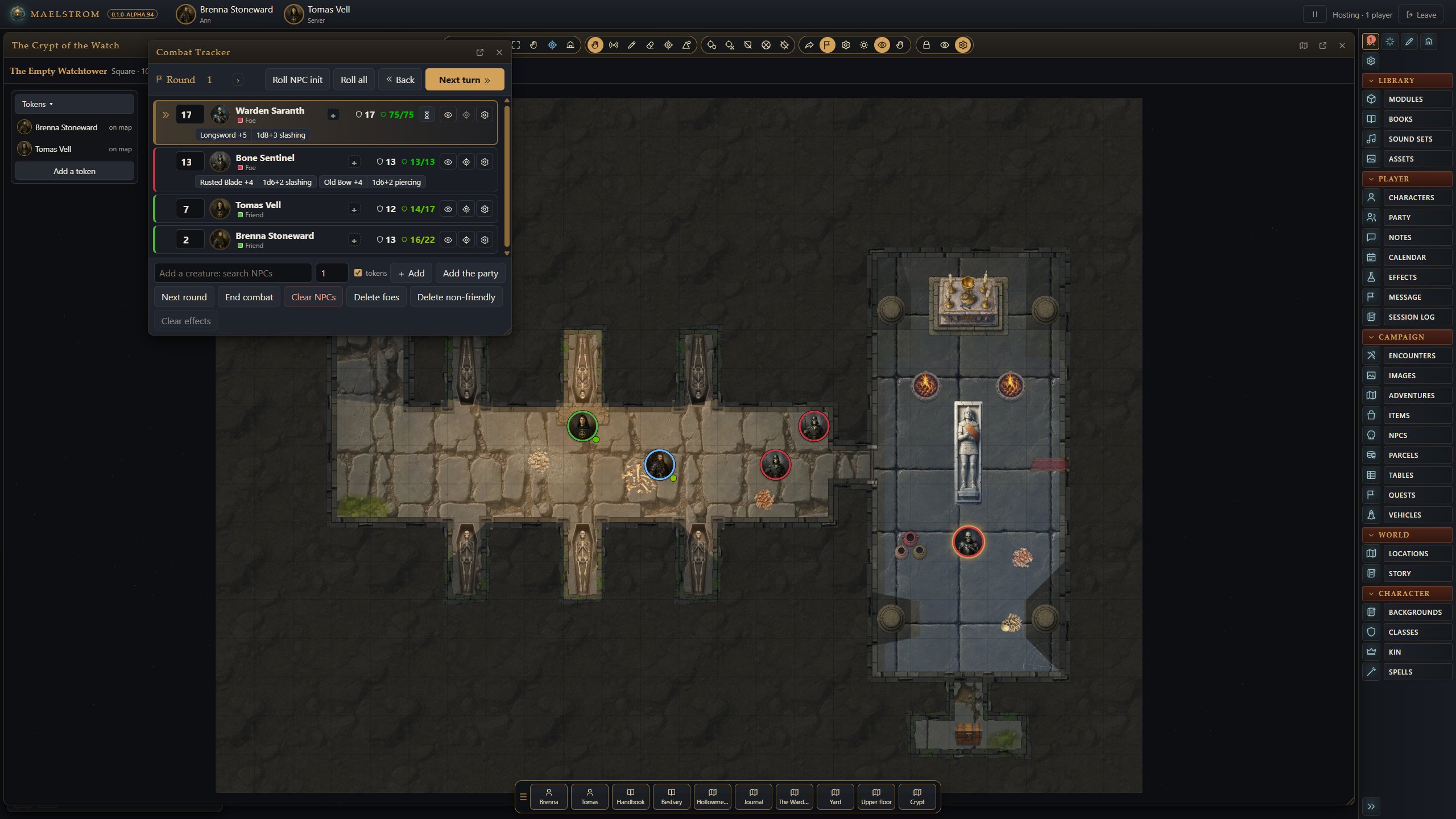
Adding creatures
- Drag characters and creatures into the tracker.
- Add them from an encounter (see below).
- Or use the tracker's search box.
Settings > Combat > Creatures' hit points decides a creature's hit points as it joins: As listed in its book, Rolled from its hit dice each time (no two goblins alike), or Maximum.
NPC numbering names a creature added again: in order (Goblin 1, Goblin 2), with a random number (Goblin 14), or left as it is.
Running the fight
- Press Roll initiative.
- Step through the turns with Next turn, and Next round to move the round on. Effects tick at each turn, and durations count down.
- On a creature's turn, roll its attacks and damage from its sheet or its tracker row against the targeted token. Saves, healing and conditions work the same way, by each game's rules.
When a player's turn comes round, they get a banner and a soft chime (each can be turned off in their Settings). On every turn, everyone sees a card at the top of the screen with the portrait of whoever acts and, as a round begins, the round (Settings > Whose turn it is).
Sides, hiding and cleaning up
- Click a creature's side under its name (Foe, Neutral, Friend, No side) to move it on to the next.
- The eye hides a creature from the players, and its token with it. Hide the monsters before the party walks in; press the eye again when they are seen, and they appear in the tracker and on the map together.
- Remove, Clear NPCs, Delete foes, Delete non-friendly and Clear effects each ask once, with a Cancel beside the question.
A creature's details
More on a creature's row shows its space and reach, its offense (speed, senses, skills, languages, CR) and defense (AC, hit points, saves, resistances and immunities), and each of its traits, actions, reactions and legendary actions as a name: click one to read it there. Record opens its whole stat block.
Delay and Act now
Delay on the active row lets a creature wait. Act now brings it in at once, after the one acting.
Corrections
- Back returns to the turn before.
- ‹ › beside the round moves it back or on.
- Type a number in the round box to put the counter right (back or forward). Nothing is undone or counted down: it is the number alone.
- Click a row's arrow space (or drag the arrow there) to make it that creature's turn.
Next turn and Next round run the rules (durations, ongoing damage). Back and Round back undo those turn changes: effects that ran out come back and ongoing damage is healed, while what happened during the turn stays.
What players see
What players see of your creatures' health (Settings > Tokens and measuring) counts for the tracker too: nothing, the status, a bar, or the numbers. Damage and healing float off a token as numbers (red down, green up) for the GM, and for players where the tracker shows them numbers; never for a hidden token.
A creature with a Players call it name is called that on the players' tracker and in chat.
Encounters
Campaign > Encounters holds the adventures' encounters and the campaign's own.
- New makes one. Drop NPCs into it; a count can be dice (
1d4+1), rolled when they go on. - Place on this map: put the tokens where they go first; it keeps where they stand.
- Add to tracker puts the creatures on the tracker.
- End encounter gives its XP to the party sheet.
The tracker's options
In Settings > Combat (the GM's):
| Setting | Choices |
|---|---|
| Clear targets | Never (as FG), after a spell or an attack's damage, or at the end of the creature's turn. |
| Initiative | Each creature rolls its own, or one roll for each kind of creature (all the goblins together). |
| Creatures' hit points | As listed, rolled, or maximum. |
| Roll initiative every round | At each new round everyone rolls again and the order changes (FG's house rule). |
| Stop at the start of each round | A new round waits for your next click before anyone acts. |
| Skip turns | The dead and unconscious creatures, characters too, or no one. |
| NPC numbering | In order, random, or off. |
| Token effects | Conditions on tokens animated, icons only, or off. |
| Apply damage | At once (FG), or from the chat card's buttons (Foundry). |
Each game's buttons
The tracker shows each game's own buttons. Some examples:
- D&D 5E: death saves.
- Descending Darkness: Steady, a Wisdom check against 12 to stop a dying friend's bleeding.
- AD&D 2E: initiative lowest first, Death's Door and Bind wounds, Turn undead for clerics.
- Basic Fantasy: d6 initiative, Turn undead, a Morale button for monsters.
- Cairn: Sides (DEX saves) starts the fight, attacks always hit, Morale, Stabilize.
- Ironsworn and Starforged: foes as a rank and a progress track; Harm… to inflict a foe's harm.
- Fate: a physical or mental conflict, Turn order without dice, Concede.
- Forged in the Dark: no initiative; the Score button opens the Score panel.
See Games for how each one fights.
The party sheet's group roll
On the party sheet, pick a check, save or skill, and Roll for everyone, or Ask the players: each rolls from a card in chat with their own sheet. You can roll for anyone who is away, and the card sums it up.
After the fight
- The tracker shows Short rest and Long rest for the whole party (the clock moves on).
- Anyone who shot arrows is offered Recover on their sheet for what can be picked up (half, in 5E).
See Bookkeeping and rest.